




 nueva página del texto (beta)
 Inglés (pdf)
 Artículo en XML
 Referencias del artículo
 Traducción automática
 Enviar artículo por email
 Citado por SciELO
  Similares en
SciELO
Similares en
SciELO 
 Permalink
1 Introduction
User interfaces (UI) are built thinking about how people can best interact with computers to perform specific activities. However, once these UIs have been built, if the type of interface changes significantly due to various elements such as technology and paradigms, the entire system generally must be remade, investing a lot of effort into it. Therefore, the question of whether it is possible to convert one type of UI to another automatically arises. Below is a historical review of the different types of UI and how they have tried to solve this problem by limiting it to a specific type of UI. Finally, we will show our proposed solution approach to realize multimodal systems that include more than one type of UI.
The evolution of software has been directly related to the evolution of hardware, bringing with it improvements in the daily processes that people perform every day. In particular, the evolution of software has brought about various forms of interaction between humans and computers [1]. For the end user, systems are what is shown in the input and output interfaces.
The first human-computer interfaces were simple, based on command instructions written on a keyboard called a command line interface (CLI). Information systems' interfaces depend on operating systems, and the medical field is no exception. Although CLI have become obsolete over time, they are still used in the medical field to query database information [2], various sources and API Application Program Interfaces [3], and information in medical images [4], among other applications. The main disadvantage of CLI is that they are difficult for medical personnel to handle since they require learning the syntax of the commands, which is generally quite complex.
The next step in the evolution of text interfaces was the text-based TUI. TUI improved the quality of users' input and output interfaces by making them more visual, even using the mouse in some cases. This led to medical systems being widely used in medical record capture systems and the consolidation of the first medical databases [5].
The increase in the graphical capabilities of computers allowed the evolution of TUIs into real graphical user interfaces (GUIs), initially in desktop operating systems such as Windows and MacOS. This led to the proliferation of medical record and note-capture systems in the health sector [6]. However, these new medical graphic systems were isolated due to the poor connectivity of the telecommunications networks of the time. It was not until the arrival of the Internet and particularly Web systems that medical record systems could be widely used worldwide in an interoperable manner [7].
With the advent of smartphones and other mobile devices, GUIs became popular among end users through small applications called apps, and the health sector was no exception. However, due to the small size of their display screens, the interface design had to be optimized to meet this challenge. This gave rise to the first more natural user interfaces based on gestures using touch screens that we frequently use today [8]. Because of this, apps in medical systems have been used more for output interfaces displaying relevant and specific information than for input interfaces [9].
With the advances in miniaturization of processing hardware in recent years and its lowering in costs, the proliferation of embedded systems connected to the Internet called the Internet of Things (IoT) devices have been achieved, wherein the field of health care has led to revolutionizing biomedical devices by making them more powerful and with greater utility, integrating them into daily life as wearable devices [10].
However, many of these devices lack display screens, so input and output interfaces, whether textual or graphic-based, are impossible to achieve [11]. To solve this problem, new user interfaces, such as those based on voice, have emerged.
Voice-based interfaces (VUIs) are not new. They have been used since the 1970s through telephone systems, particularly to enter small amounts of information through the telephone keypad option and obtain an interactive voice response (IVR). In the health area, they have been used to consult basic information about appointments and patients, among other things [12]. These interfaces are still used today but have been displaced by chatbots in instant messaging systems [13,14].
With the advances in artificial intelligence, particularly in languages, natural language processing (NLP) has become possible. This has widely popularized VUIs through digital voice assistants such as Alexa, Siri, and Cortana, among others [15]. Therefore, the interfaces for biomedical systems have been updated. Generally, VUIs handle human voice as input and output, but internally, they work with text strings. Therefore, systems that convert voice-to-text (voice recognition) and text-to-voice (voice synthesizers) are necessary.
Particularly, improvements in high-accuracy automatic speech recognition (ASR) systems and the improvement in the quality of computerized voices are making voice-based user interfaces more friendly and natural for users, forming what are called conversational user interfaces (CUI) [16].
However, despite the enormous advantages that CUIs present, they still have some flaws, both in automatic translation and in conversations being more fluid and, therefore, more functional [17]. For many years, it has been proven that combining two or more types of interfaces or modes can produce better results since humans do this daily with our senses, such as sight, hearing, touch, smell, or taste. The combination of two or more user interfaces is called a multimodal system [18].
The development of multimodal systems has spread to all areas, such as health [19], combining text, graphics, voice, and other types of natural language user interfaces (NLUI) [20]. Various works have been developed that have focused on improving the development from scratch of these multimodal systems [21], especially in improving the user experience [22] and making them more conversational and functional [23,24]; however, there have been few that have focused on the integration of these systems separately [25].
Some works and studies focus on the automatic conversion of graphical or textual interfaces to voice [26,27]; however, few have focused on this topic, focusing more on applications such as automatic software testing [28].
Currently, the simplest form of integration is to add a microphone to the GUI to allow form data to be captured by voice rather than the keyboard. This is useful for capturing large text fields such as clinical notes; however, manual integration is needed for clinicians to make efficient use of the tool [29].
The problem of automatically converting GUI to multimodal systems: GUI+VUI has been recently addressed by [30]. However, the study is very limited to the internal structure of Web systems and does not consider the dialogues between users that are used in many other systems, such as health systems.
This work presents a methodology accompanied by a tool that can automatically obtain a multimodal system through an existing Web GUI, first generating a VUI of the dialog obtained from the system interfaces. To do this, the obtained dialog is compared with the recorded dialog of doctor-patient conversations. The VUI obtained is integrated into the existing GUI to obtain the functional multimodal system. The tests were carried out on a functional prototype based on the Mexican Social Security Institute (IMSS) family medicine system. The results demonstrate that the conversion is viable, facilitating the system's interaction, reducing capture times, and improving patient care.
The main contribution of this work is the general methodology that can be used from convert and existed GUI on medical systems and, with few adjustments, adapted to other conversational multimodal systems. Currently, the automatic conversion of a GUI to obtain a VUI is little developed. Its integration to form an MmS that takes advantage of the advantages of natural language over an existing GUI without redesigning the system makes it a relevant contribution to the area of HCI.
The manuscript is organized as follows. Section 2, Materials and Methods, shows the methodology, detailing what is done phase by phase. Section 3 shows the results and briefly discusses them. Finally, the last section presents the most relevant conclusions of this work.
2 Materials and Methods
The problem with building multimodal systems is that a major redesign is needed, especially if the existing GUIs were not designed with conversational dialogue in mind to include voice. On the other hand, VUIs have been designed to handle voice dialogue on a one-to-one basis, complicating the capture of information and making its integration difficult.
A system is a set of interrelated elements that work for a specific purpose. From an information technology perspective, an information system comprises software, hardware, data, processes, and people. Hence, a medical system covers all these aspects to achieve health care for people [31].
An interface is the mechanism through which a system interacts with other systems or people for the input and output of information. Specifically, user interfaces make it easier for people to use systems, introducing fewer errors and generating better results [32].
Dialogue is the conversation between the user and the computer within a UI. Therefore, dialogue focuses on the content of human-machine interaction [33]. Dialogue is composed of various components depending on the type of UI.
A UI Dialog D can be conceptualized as the sum of each component (components can be text labels, headers, text boxes, drop-down lists, etc.; that is, any widget or control), Xi, as shown in equation (1):
A multimodal system (MmS) can be conceptualized as the integration of multiples systems (S) as shown at Equation (2):
where each S is formed by a UI, and each UI is formed by various X components. Finally, an MmS is conceptualized as described in equation (3):
where U represents users, P represents processes, Da represents data, Hw represents hardware, and finally, D represents all the dialogs of each UI of each S.
The development of any multimodal system requires analysis and design of the solution. Currently, the most used UIs are GUIs and VUIs. For this reason, an MmS is obtained by integrating two or more interaction modes in a system. For this reason, Figure 1 can be seen as a method for developing an interactive medical system.
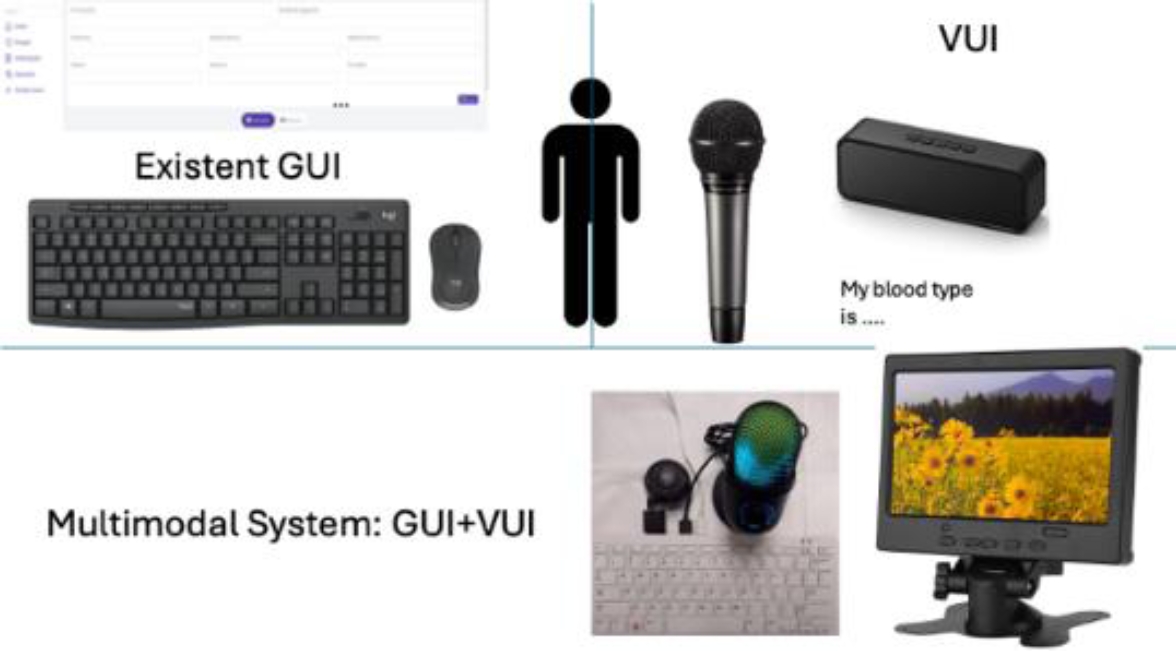
Figure 1 describes a GUI of a Web system, which, to be multimodal, needs a VUI. This VUI is intended to be obtained automatically through the dialogue obtained directly from the GUI since the construction of a multimodal system manually is complicated by having an existing GUI.
As can be seen in Figure 1, the multimodal system that is intended to be obtained is an embedded system like a voice assistant but with a screen, mouse and keyboard that allows the system to be used both graphically and by voice. A Raspberry Pi 400 is being used, although another single-board computer (SBC) or a mini-PC can be used. High-performance speakers and an omnidirectional microphone have also been connected to it.
In this case, the MmS is the composition of two UI (see Equation 1). The first, the existed GUI already implemented, and the second, the VUI. The VUI is automatically obtained of the NLP of the existed GUI and integrated in only one system the MmS.
The general methodology of the proposal solution is shown at Figure 2. First, acquiring doctor-patient conversations is carried out to generate a database of conversations.
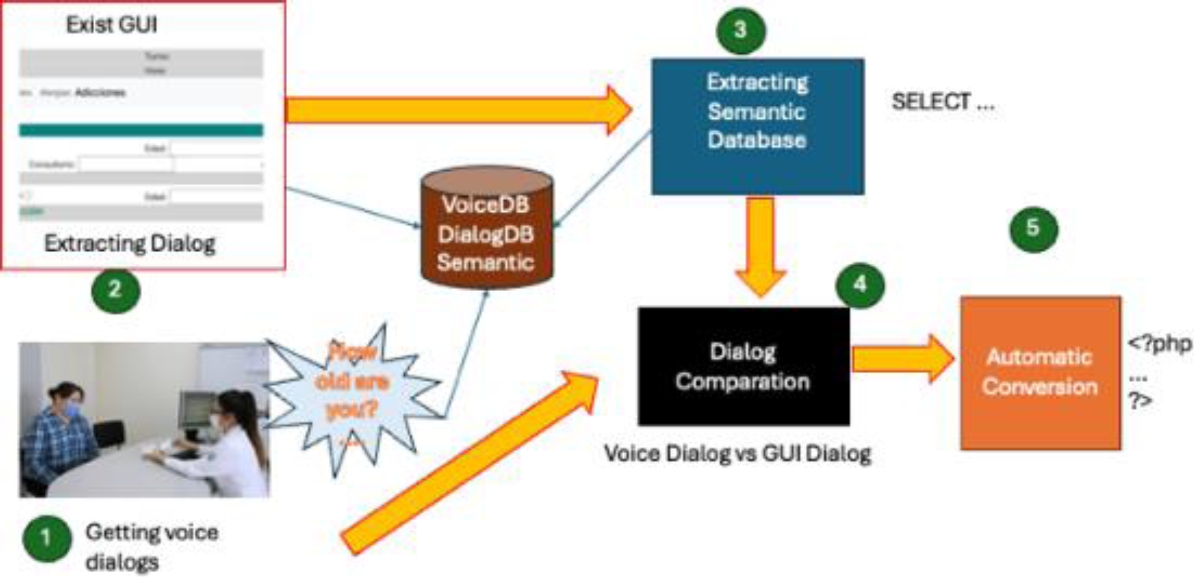
Second, although it is the initial part, the first step was advanced due to the time required to record the conversations. A PHP form file (which is how the system is built) is analyzed, which includes HTML tags, to obtain the database of GUI dialogs.
The third step consists of analyzing the source files in PHP to obtain the SQL instructions that dictate the semantics of the database.
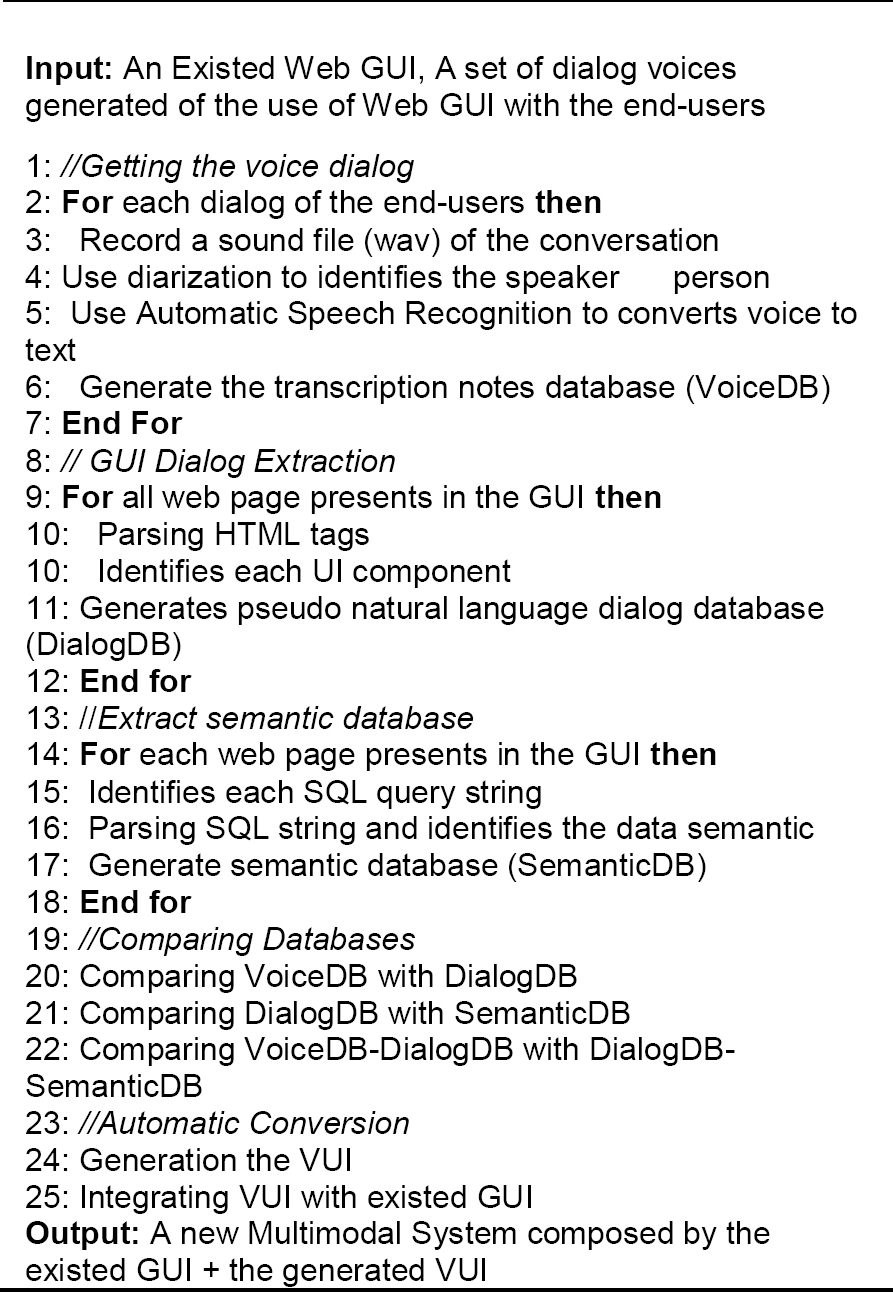
The fourth and most relevant step consists of comparing the various dialogs obtained to find the variability of the conversation and, finally, obtaining the VUI and integrating it with the existing GUI to complete the multimodal system automatically. The next subsections describe each phase of the methodology. Algorithm 1 explains in general and formal terms the steps of the proposed methodology.
2.1 Getting Voice Dialogs
Three doctors were recorded during a period of one full month at the IMSS Diabetes Care Center (CADIMSS) of Clinic 75 in the city of Morelia, Mexico. A recording of 40 conversations per doctor was obtained for a total of four system interfaces: personal data, addictions, allergies, and traumas since these are the most used modules of the IMSS family medicine system.
It is worth mentioning that informed consent was signed by each patient who decided to participate in the experiment, where sensitive data was protected to safeguard privacy. A shadow study showed how doctors use the system through conversation recording.
A Python script was created to record doctor-patient dialogues using the Whisper [34] model from OpenAI. The automatic recognition of the speakers in a conversation and its automatic translation into text was made with Pyannote Python model [35]. The heuristic was that the doctor spoke first and then the patient. Once the voices are labeled, the ASR model detects with good precision each time a voice speaks. The model can detect several people simultaneously and label them appropriately. The tests were carried out considering that in addition to the doctor and patient, there could be an extra companion (in fact, if more voices are detected, they are all homogenized as the patient's voice).
Figure 3. shows the process for getting the voice dialogs in clinical text notes. The text is saved in a database where the audio transcription of the text is kept, indicating which module it was from and with which doctor. The database manager used is MySQL.
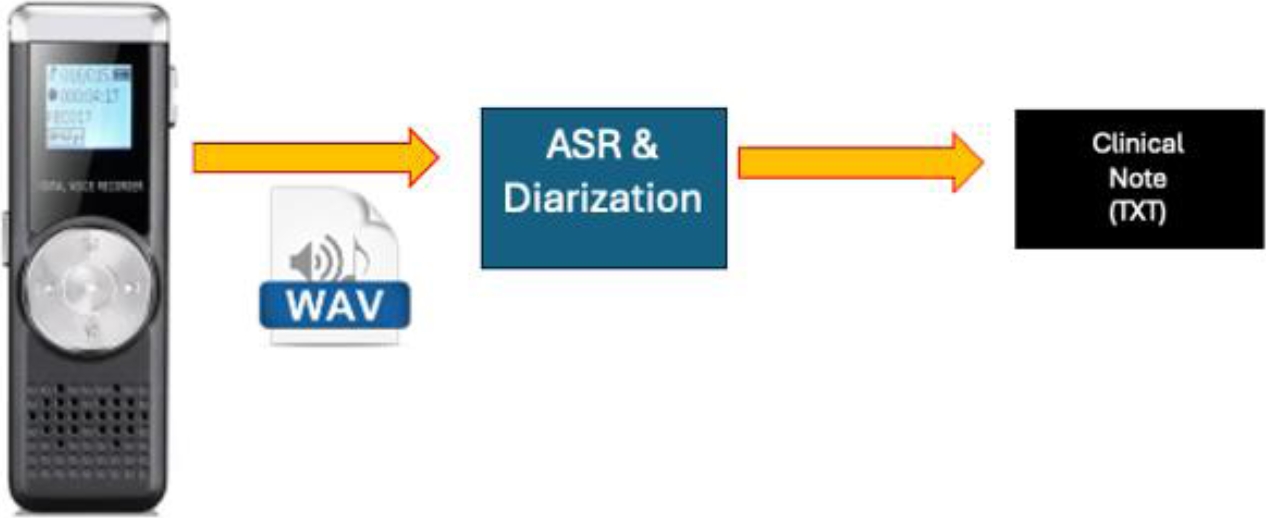
Table 1 shows an example of a text transcript from the additions module that will be described later.
Table 1 Text Transcription obtained
| Doctor: Good morning. Please sit down. Regarding your history of addictions, do you have any? |
| Patient: Yes, but it was many years ago. |
| Doctor: Allow me to give you your general information. What is your name? And how old are you? |
| Patient: I am Joe Doe, and I live in such-and-such neighborhood here in Morelia... |
The participants of this conversation have been tagged as patients and doctors, as this will be stored in the database to facilitate its processing later.
2.2 Extracting Dialog
Every user interface has a specific purpose, generally allowing the introduction and/or visualization of data to the user through the problem to be solved, which it will call semantics.
For example, Figure 4 shows a Web Form of the additions module of the IMSS family medicine Web system. So, we ask ourselves, what is its purpose (semantics) and what is the purpose of the interface?
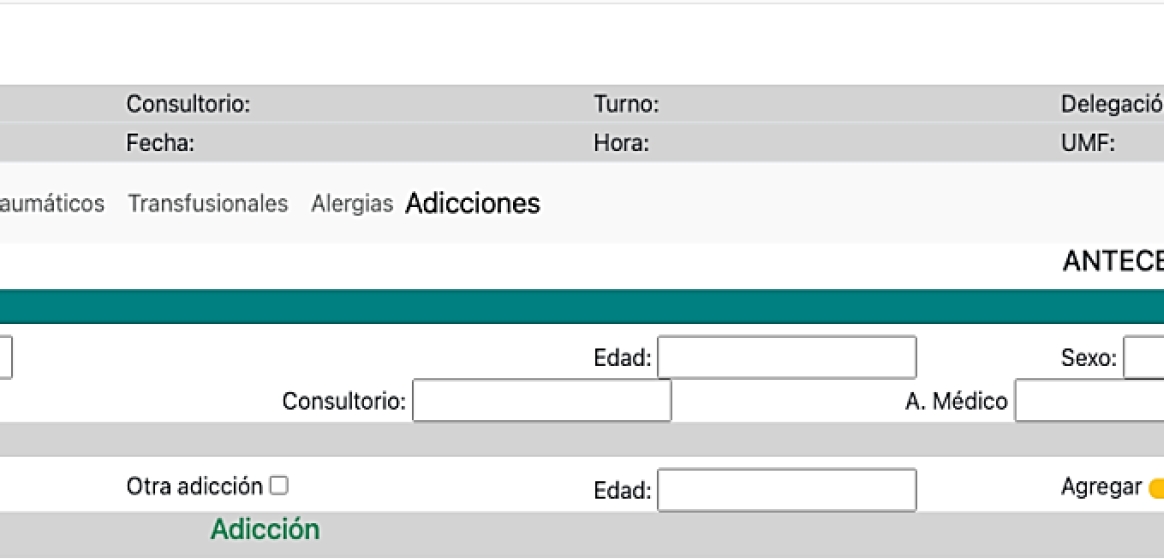
For the computer, the interface is a file in PHP format with HTML tags that integrate styles in CSS and functionalities in the browser through Javascript. These are displayed in the browser and shown to the user through a data capture form. However, informative data is also extracted from the database and displayed on the screen.
For the end user, who in this context is the doctor, the form allows the introduction of data regarding the patient's allergies; this refers to the purpose of the interface, while the semantics of the form refer to the fact that this data is stored in a database for later consultation. As mentioned in the previous paragraph, this interface also has data from an output interface to show the doctor information about the current patient being reviewed.
But how is it that this purpose of the interface and the semantics of the GUI are given to the computer? The answer is that software developers, before programming, had to do a process of analysis and design of the system, but before the analysis, a process known as requirements engineering was done; in this process, the needs of the end-users (patients, doctors, administrators, etc.) are reflected, so that finally a process of user interface design is reached where these needs of the users are reflected concerning the functionalities of the system [33].
Where order is extremely important. The order is generally related to cultural styles; for example, start from top to bottom, from left to right; if there is information in columns, start with the left column and then go through the columns at the end.
Figure 5 shows how is made the dialog extraction through GUI dialog of Figure 4. Note the set of interface components is shown below due to Formula (2) explains a Dialog D as a sum of each control and widgets (text fields, labels, buttons, etc.). First, a generally descriptive title is represented by the <h1> tag, which describes the form of Addictions. Then, a series of text labels are present in a table, such as User, Office, ..., and UMF, represented by <p class="output"> tags, which show the doctor's context information. Then, there is an action menu with the options ECI, Doctors, ..., Addictions. The menu is marked with the <nav> tag, highlighting the Additions option with a <mark> tag. The semantics up to this point have been informative, where the purpose is to show the doctor the context of the patient.
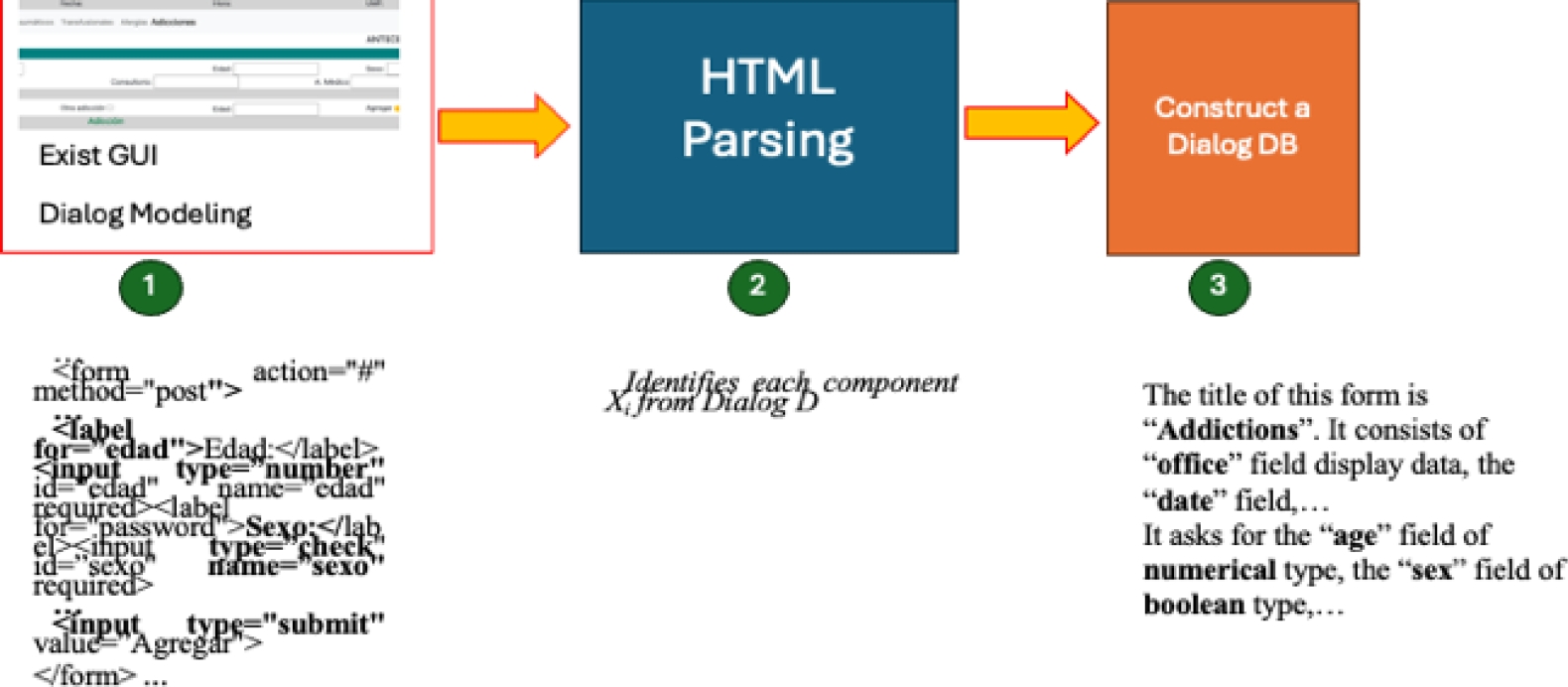
Next comes the most semantic and purposeful part, represented by the <form> tag. There is a <legend> tag to mark the background section. There is also a subtitle represented by <h2>, which represents the Patient data section. Several text fields about the patient are described below, so the first field is an example. There is a <label> tag with the value Name and a text box with the <input type="text"> tag associated with that name. Finally, a subtitle called ::Addictions:: represented by <h2> describes a dynamic interface to add a history of additions. The latter is represented by check boxes <input type="check"> and a yellow add button represented by <button> whose semantics consists of acting like adding.
But up to this point, how is the previous Dialog represented by the form in Figure 3 converted into natural language? To solve this question, a string is joined with the obtained dialog, having something similar to Table 2.
Table 2 GUI database obtained
| Title: Additions. Options Menu: ECI, Doctors, .., Additions. Output Information: User -> X, Office -> Y, ..., UMF: 75. Input Interface: Title -> Additions History, Subtitle -> Patients; Name <- $name, ..., Physician <- Assistant. Subtitle -> ::Addictions::, Addiction <- Y/N, ..., Button => Add |
The data is labeled for better storage and later processing. Context information, such as the title and the input and output interface, are saved, the latter being the most relevant. In addition, the symbols '->' are used to indicate the output of information, '<-' to indicate input, and => to indicate an action.
2.3 Extracting Semantic Database
The next step in the methodology is to determine the business model, which for this type of application is found in the data-centric architecture. To do this, it is necessary to analyze the semantics of the database through its operations, in this case, a relational database. To do this, all text strings containing SQL instructions are analyzed. The heuristic used was to handle basic SELECT, INSERT, UPDATE, and DELETE operations.
It is important to emphasize that PHP generally contains database access codes such as connection instructions, manipulation (additions, deletions, modifications), and queries. This has been called CRUD for its acronym, Create, Read, Update, and Delete. It is also associated with Web services that expose the information stored in the databases.
In addition to the formal SQL syntax, database strings contain data model information such as entities (tables), attributes, and relationships between them. For the extraction of the database strings, the Python “re” library was used, while for finding the different components, the SQLGlot library was used, which has support for 21 different SQL dialects, including SQL.
Table 3 shows an example of a database text string found in the additions module example and its conversion to database semantics.
Table 3 DB Semantics obtained
| DB String: |
| SELECT |
| Medico.Usuario, |
| Medico.Consultorio, |
| … , |
| Consultorio.UMF |
| FROM |
| Medico |
| INNER JOIN |
| Consultorio |
| ON |
| Medico.ID = Consultorio.ID |
| DB Semantics: |
| Tables: Doctor, Office |
| Fields: Doctor.User, Doctor.Office, …, Office.UMF |
| Action: Show |
The database string has been broken down into its main components; however, the semantic action of this chain still needs to be determined. For this example, the context is informational and must be associated with the variables displayed in the GUI. For example, the field Office. UMF is associated with the variable $UMF. It is worth remembering that queries are usually incomplete from the start and must be completed. For example, in the previous example of the additions module, in the patient additions history section, fields such as Name, age, ..., Doctor has the database chain: INSERT INTO Patient (Name, age, ... Doctor) VALUES ('$name', $age, ..., '$Doctor); so, the values of the variables must be associated to have the complete string.
Finally, all the database strings must be put together in the order in which they appear in the source code. It is important to emphasize that the strings go in the specific order marked because their meaning could be altered otherwise. Once all the database strings are obtained, they are stored in the semantic database.
In general terms, a “Reverse” Object Relational Mapping ORM process was carried out.
2.4 Voice Dialog Comparation
In this phase, the conversation dialogs are compared. The interface dialog is compared with the semantics of the database. Therefore, there are three databases: VoiceD, Dialog DB, and SemanticDB.
The information from the SemanticDB and DialogDB databases is already available for direct comparison since they are bounded languages: the SQL database and the dialog database are the discrete components of the GUI. However, the information from the VoiceDB database, although segmented into patient and physician entities, needs to be separated more specifically for comparison with the other two databases.
To achieve the correct detection of the parts that make up the dialogue of the conversations, the named entity recognition technique was used. For this purpose, the Spacy library was used with a base language model in Spanish. This library recognizes general entities useful within the clinical note, but for the vocabulary of the specific medical context, the pre-trained model med7 [3] was used, which falls within the category of Medical NER (MNER).
For example, for the voice dialog conversation example in section 2.1, its MNER separation is shown at Table 4.
Table 4 MNER of Table 1
| Doctor: (Not specified) |
| Patient: (Not specified) |
| Joe Doe: (Entity Type: PERSON) |
| Morelia: Location (Entity Type: LOCATION) |
The previous example was very simple. Now consider the voice dialogue described in Table 5.
Table 5 Another MNER of new conversation-
| Voice Dialog: |
| The patient, Juan Perez, was diagnosed with type 2 diabetes two years ago. He is currently taking metformin 500 mg twice daily and lisinopril 10 mg once daily. He is also being treated for hypertension and reports occasional headaches. The doctor recommends continuing the treatment plan and following up in three months. |
| NER Translation: |
| Juan Pérez -> Entity Type: PERSON diabetes type -> Entity Type: CONDITION metformin 500 mg -> Entity Type: MEDICATION lisinopril 10 mg -> Entity Type: MEDICATION hypertension -> Entity Type: CONDITION headache -> Entity Type: SYMPTOM three months -> Entity Type: TIME |
With the information already segmented from the medical entities, it is possible to associate each component of the three databases and proceed to the generation of the VUI and its integration in the next and last phase of the proposed methodology.
2.5 Automatic Conversion
In this phase, the conversation dialogs are compared. The interface dialog is compared with the semantics of the database. Therefore, there are three databases: VoiceD, Dialog DB, and SemanticDB.
The information from the SemanticDB and DialogDB databases is already available for direct comparison since they are bounded languages: the SQL database and the dialog database are the discrete components of the GUI. However, the information from the VoiceDB database, although segmented into patient and physician entities, needs to be separated more specifically for comparison with the other two databases.
A mapping between the databases is performed to generate VUI code and integrate it with the GUI for the multimodal system. The natural dialogue obtained from VoiceDB serves to generalize the various ways in which the doctor and the patient can speak. This information is first related to the data in DialogDB to locate the relative information in each field. Finally, the last comparison is made with SemanticDB to validate that the SQL queries are structured correctly based on the previous information from VoiceDB+DialogDB.
To carry out this step, a Python script was created that performs the comparisons and generates the VUI code based on the WhisperAI API.
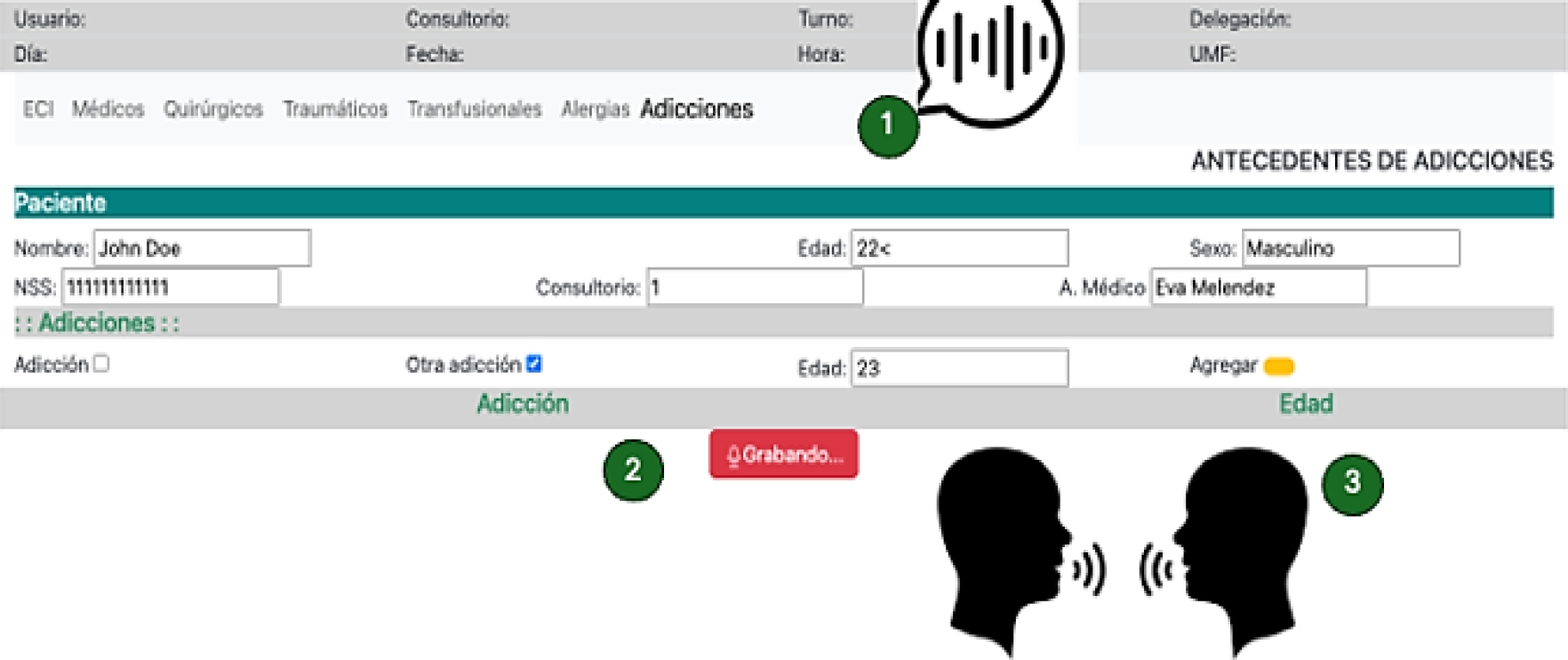
It is also worth mentioning that data is not inserted automatically, leaving it up to the doctor to perform the actions, such as clicking on the add button.
This is illustrated in Figure 6, where the multimodal system created from the generated VUI. First, the output interfaces are deployed to the end user through the pyttsx3 speech synthesizer. Second, the new UI has a stop recording button. Until the recording is finished, the form fields are filled automatically.
3 Results and Discussion
3.1 Getting Voice Dialogs
The pyannote model receives the audio recordings in WAV format and displays the received text to measure its effectiveness. The 120 transcriptions were made by hand to check their effectiveness regarding those generated, identifying whether it is about the patient or the doctor and knowing if the generated conversation corresponds to the one in writing. Only 5 errors were obtained, for an effectiveness of 95.83%.
For the evaluation we compared the recordings using a manual conversion of the clinical notes and compare how many words differs with the automatic transcription. We perform pre-processing and ignore fillers and common writing errors.
The errors were mainly because some words, such as medicines, which are not so common vocabulary, had some details when transcribing them into texts. To solve this problem, the “Med7” library for medical-named entities was used (see section 2.4). Although trained in English, it helped improve the conversion accuracy by having only one error, for a total effectiveness of 99.16%.
It is worth mentioning that the conversion recording is done in a controlled environment with little ambient noise. The pyannote model controls ambient noise to a certain extent, but it fails very often when two people are talking at the same time, if there is loud external noise such as ambulance sirens, or if there are crying children.
3.2 Extracting Dialog
The four selected modules were tested to extract the GUI dialog. Each module has both input and output interfaces. To test the correct operation, the conversion of the obtained dialog with the generated dialog was validated (done manually). We checked is there not an error in the parsing HTML and in the process of generating the object code, in this case the dialog representation in pseudo natural language.
Of the four modules, three had no issues; only the allergies module initially failed the conversion. This was because the HTML page structure did not have a proper tag structure; for example, in this case, the question tags in the forms were not marked as HTML, so the conversion algorithm needed to be improved to consider left—and right-hand side text and metadata from the input controls.
Finally, the order of the controls and their flow is important, although, as will be seen in section 3.4, the order obtained, although it may vary in its final comparison, is not really affected, given that, for example, the order of the graphic components is not always affected when it is placed in the appropriate order in the queries generated to the database.
3.3 Extracting Semantic Database
The strings sent to the database server were compared with the generated strings to validate the correct extraction of the database strings. Of the 17 strings found in all modules, only 9 corresponded directly; however, the 17 strings obtained produced the same results in the database.
The apparent errors in database string comparisons are basically since not all programmers place query strings in accordance with form fields (unless automated tools such as ORM are used).
An example of this is shown at Table 6. SQL is a huge language, and one database query will be written in several ways. Most of the Database Management Systems have a Query Manager and rewrite all SQL queries for an optimization form. Also, it is complicate to try to understand the data semantic if the fields are expressed in mnemonic ways; for example, the app_date referes to an application date or appointment_date.
3.4 Dialog Comparation
Cross-tests are performed to validate this stage. First, the validation of the GUI dialog concerning the text strings is performed. It was assumed that, for our example, Table 2 is compared with Table 3, which indicates that the graphical interface dialog works concerning the semantics of the database. There was no problem in our case since the languages are limited.
With the GUI dialog's validation, we compare the dialog obtained from Table 5 with the previous result. This decision was made because having a complete natural dialog with a bounded GUI dialog is easier to compare with the bounded language. So far, all tests have been unitary to the required functionalities. In section 3.5, the system tests that are already functional with the users will be shown to validate the methodology proposed in this work.
3.5 Automatic Conversion
For the final validation and to check the correct creation of the multimodal GUI+VUI system, 120 consultations were carried out again with the three doctors from the 4 modules of the system with the same patients. An attempt was made to reproduce the doctor-patient conversations already recorded as faithfully as possible with very few differences.
The first thing that could be observed was that, on average, the system takes 4.66 seconds to perform the voice conversion and correctly place the key values in the appropriate fields of the form. This could be observed to have caused some fear among the doctors, who did not know if the system was working.
Regarding effectiveness, 100% of the fields could be filled out correctly except for the detail on 3 words referring to medication and specialized medical vocabulary that were written incorrectly. For these reasons, the methodology is generally considered correct.
3.6 Comparison with other Related Works
So far, no work in the literature has done something similar to this work, but below is a comparison with related works in some of the parts that make up this work.
As regards the automatic conversion of GUIs to obtain a VUI and therefore an MmS, the work [30] presents a great similarity with ours in terms of the percentage of accuracy in the conversion since the authors report a 95% accuracy in 600 documents. Our approach gives a 90% accuracy in 40 GUI-dialogs, but the proposed natural language approach has a more fluid dialog and presents better usability performance (see section 3.7).
Concerning the first part of converting voice dialogues to clinical notes, there is very diverse work in achieving better automatic voice recognition and being able to perform speaker segmentation, as seen in the APIs and models used [3, 34, 35], but using dialogue in the company of a GUI that handles the Spanish medical language does not exist. Work is being carried out in Mexico because it will soon appear to focus on the medical field, such as BETO [36].
In [37], the challenges and opportunities of medical systems are visualized, with the growing need for integrating existing medical systems based on GUI and/or CLI with new VUI systems in development highlighted.
In [38] and [39], a formal comparison is shown between the use of GUIs and VUIs in virtual reality (VR) systems, demonstrating that their combined use improves the usability of the transactions performed.
Murad et al. [40] were among the first to discuss the principles for designing UIs, including VUIs and GUIs.
Both [41] and [42] have focused on formally evaluating GUIs and VUIs together, highlighting some areas for improvement and formally determining that their combination in a multimodal system improves users' use of the systems.
Finally, in [43], a work that reverse maps a VUI to a GUI is presented. This work, which uses voice commands, aims to build more usable GUIs than if they were designed separately. All these works show the need for a methodology to integrate MmS automatically but also point out that their usability and UX must be reviewed.
3.7 Evaluation of MmS
On the other hand, tests were carried out to validate the proposed methodology with four other modules of the Technological Institute of Morelia's Modified Integrated System (SIM): Calendar, Social Service, Research Projects, and Degrees, as shown in Figure 7.
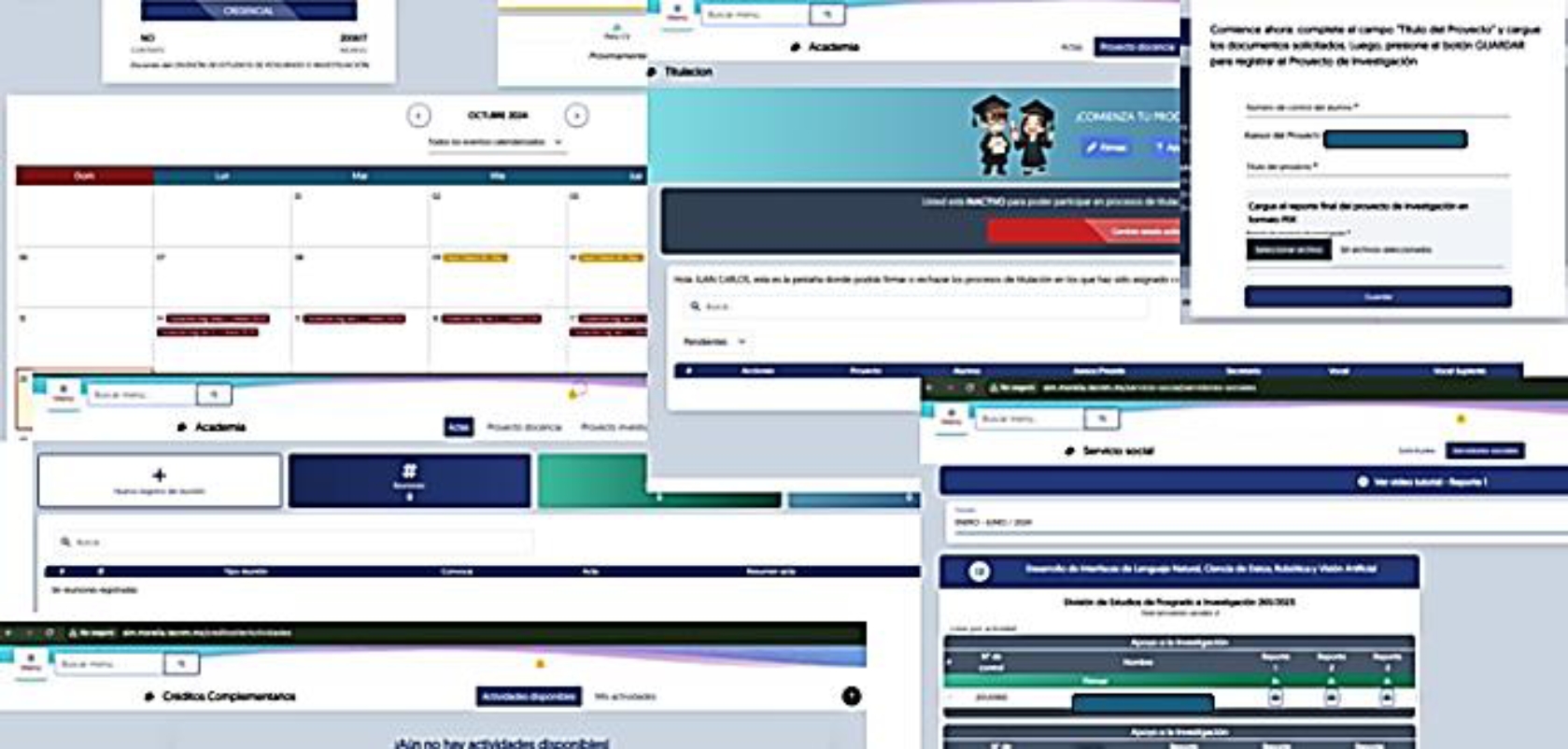
At first, it was observed that the dialogue obtained is unidirectional between the computer and the end user, in this case, a teacher, but that the first part of the methodology (generation of VoiceDB) works without conversion problems.
Converting the GUI to obtain its dialog in pseudo-natural language was not a major problem since the test system is developed with the Laravel framework and generates well-structured and formed HTML.
However, the automatic conversion of SQL statements to obtain dialog semantics at startup presented several problems since the SQL query strings were not literally in the source files in most cases. Laravel and other MVC-based web frameworks use query wizards that mask the complexity of data access by simpler facade architectures. Fortunately, these facades use the exact keywords as SQL statements, so modifying and correctly obtaining SemanticDB was easy.
The generation of the VUI and its integration into the MmS did not suffer any setbacks, thus proving that the proposed methodology can be easily adapted to any system.
Finally, an A/B test was performed to validate the system's functionality from the end user's point of view. This type of test was chosen because, according to the literature [44], it is listed as the best for these purposes. Test A was the existing GUI for our tests, and test B was the developed MmS. To do this, a sample of 10 new family doctors was taken who had not participated in the development nor were involved in the diabetes care process (CADIMSS). The doctors used the system on a working day (6 hours), interacting with the system as usual. In both cases, most of the doubts and problems were more related to the general care process for diabetic people, who generally did not know the process.
The doctors in system A, felt very familiar with the system since it is an extension of their family medicine system. They did not struggle much but did not give any different feedback, except for the most common complaints that access to the network is slow and sometimes the system crashes. The users of system B, felt a little confused at first since they were only briefly told how the new system worked, but after a few minutes, they could use the voice functionality and saw substantial improvements in the system. Among the improvements, it was seen that it is faster to fill out and consult information through a more natural dialogue between the patient and the doctor, spending more time attending to the patients than typing on the computer. However, some medical words (14 in total were identified) were not translated correctly, so correcting them in the system was necessary.
Although they were not the test subjects, the patients' opinions were also considered, considering it very useful to make the medical consultation more pleasant and human. It was also noted that the voice recognition system is susceptible to loud noises in the office, such as children crying or several people talking at the same time (the system was able to consider that if more than two patients speak, they are regarded as one). It was noted that in some cases, the conversion times and placement of the information in the multimodal system were slow, but this was due, in most cases, to the latency of the local network. However, on a few occasions, it was noted that it was because very long dialogue times are handled, so if they were made smaller, even if there were several dialogues, the conversion and adaptation times were faster.
4 Conclusions
This work shows that it is possible to automatically convert a Web GUI into a multimodal integrated GUI+VUI system from a medical system. Below are some considerations to make this methodology more functional and apply it to other contexts.
First, a more in-depth study on usability and User eXperience (UX) is necessary to determine the best way to integrate users. In our context, doctors considered displaying output information in an auditory form bad practice since it is a bit time-consuming and repetitive to display context data (clinic, UMF, etc.) in a spoken form; it is better to simply leave the existing information on the screen (other elements such as tables or images are not suitable for a single VUI).
Regarding using the VUI automatically, faster conversion times are required to avoid uncertainty among users (doctors), so future work will be done to partially implement smaller dialogs.
On the other hand, it was necessary to adapt the technical vocabulary to the context of the application to make the methodology more functional. In our case, family medicine and diabetes consultations, but for example, for a point-of-sale application, it should be adjusted to the products being sold. The system is also dependent on good programming practices, in this case, representing the structure of the websites using metadata and good page markup using HTML. Additionally, business modeling should be considered, including the different types of databases.
Particularly in developing countries such as Mexico, it is necessary to improve the medical infrastructure both in the ICT part (better network connectivity, better computer equipment, better training for health personnel, etc.) and in medical care (better offices with more lighting, ventilation, noise insulation, etc.) although the proposed methodology can be adjusted to work with these limitations (for example, the system can distinguish and tolerate particular environmental noise; network latency can be improved by running the models locally to match the changes on the server later).
It is also necessary to conduct a more formal study on aspects of usability, human-computer interaction, and UX, among others, that will allow us to validate that the multimodal system obtained is better than its isolated components of traditional GUI and automatic VUI.

